Brother, aka Genie KH710, refurbished in March 2023

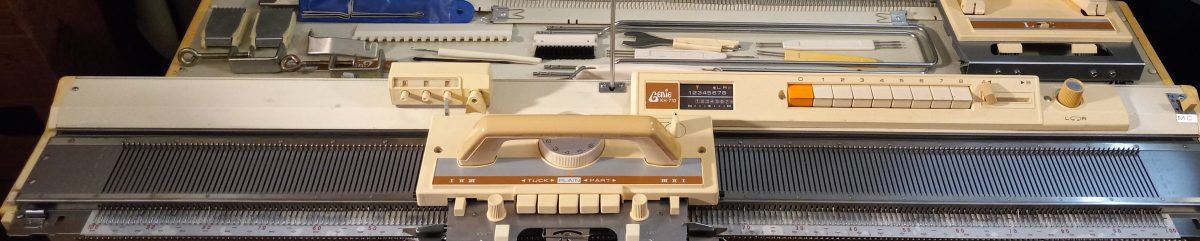
Brother/Genie KH710 knitting machine is a 4.5 mm (standard) gauge machine with 200 needles. This chart states that it is the same as KH588 but my experience with both KH710 and KH588 is that those are slightly different (see my other post).

Brother KH710 is one of the latest models for the 8-push button knitting machines and has a lot of modifications not present in earlier models (like KH552-KH588). The case has more plastic (for example, end caps are plastic and not metal like in KH588 and earlier 8-push button models). The carriage covers as well as the handle are also not metal but plastic. The standard setup comes with a lace carriage and cast-on combs. The handle no longers screws on but is permanently attached to the carriage (good – fewer things to lose – I see so many machines arriving without these screw-on handles). But the handle folds for easier fitting into the case.

Besides 8-push buttons, genie 710 has a pattern center, which allows you to fix the needle selection and simply move the following needle selection relative to the initial position. It also allows (using the reverse lever) to select either needles push-in or select needles, not pished-in.

About this particular machine:

It was very easy to use it. The carriage slides very easily – in my video I show that I could use just one hand.

The machine comes with all major and minor assesories. 

The assesories fit nicely into a special toolbox with a matching lid.

The hard copy of the manual will not be included. The manual is available for download here. It mentions some of the patterns and button/lever variations. More patterns and variations of push buttons can be found here.

I inserted a brand-new retaining bar with a brand-new sponge. All needles were inspected individually. I tested this machine on a full bed using stockinet, pull-up, and tuck-stitch patterning (shown in my video). None of the needles were mispatterning and the knitted fabric looked even and great. 

After I gave it some TLC, the machine feels and looks like new. It is very lightweight (because end-caps are plastic.

The case has some cracks: see the pictures below but they do not affect the functioning of the machine.

Genie 710 is excellent for beginners or for advanced knitters who prefer hand-manipulations of stitches and needles. I hope you will consider adding this machine to your craft room.

2023-02-06 KH588 for Holly, cleaned and tested in February 2023

This is a Brother KH588 knitting machine with an 8-push button needle selection mechanism. This model was released to the market in the late 1960s-early1970s. This model is equivalent to a rebranded Genie 710 (in case you need to search for information related to this machine). These are other 8-push button models similar to this one: KH581, KH560, and KH552, but their pattern control center is a bit less “sophisticated”. The pattern control center in KH588 makes your job of creating patterns and following the sequence of which buttons and levers to push the easiest.

The “patterning center” consists of:

  • 8-push buttons. If a specific needle wants to be selected, the corresponding button is pushed. The red button cancels out the button selection.
  • Slide dial (the blu knob on the white panel. It determines in what direction (left or right) the needle selection will be moved relative to the very first selection
  • Slide indicator (to the left-hand side from the push buttons). It helps to determine in what direction the needle selection is moved and also what needles are currently being selected.
  • Reverse lever (the bluish knob to the right-hand side of the pushbuttons, it is left to the slide dial). If the reverse lever is pushed to the right, then the needles that are not selected by the pushbuttons will be moved (AKA selected).

    In my video, recorded specifically for this machine, I demonstrate three patterning techniques and how I moved the levers, knobs and a ratchet. At first, it took me a while to figure out a chart but after just 5 minutes, I was able to develop a groove and knitted faster without problems. More sophisticated patterns (many of them can be found here) will probably need a bit more concentration. I also tested knitting cables on this machine. The hardest part of the cables is to keep track of which stitches on which needles to swap. But with the patterning center on this machine, these positions can be kind of memorized by the buttons pushed and it makes keeping track of stitch-swapping easier.

A couple of things I personally found interesting in this model. Check out the carriage image below, in particular, the levers on the bottom left and right sides of the carriage with markings I, II, and III. This feature was unusual to me since in other early versions of Brother knitting machines (manual 4- and 8-push buttons) these levers are on the actual sides of the carriage. I found this feature of KH588 very convenient. The positions of the levers are right in front of your eyes and it makes it less hard to overlook the position of these levers (which happens quite often ).

About this particular brother KH 588 machine.

In this particular machine, the words on the carriage (with the exception of huge BROTHER branding) are in Japanese. I asked the knitting community and apparently, not all KH588 are in Japanese. At the very end of this blog, I show pictures to be used as English references.  Maybe this machine was brought from Japan.

Below are the pictures of pattern examples I tested (also shown in my video on all 200 needles).

  • The top is the tuck-patterning on every other needle (EON) selected. On this side, it almost looks like a seed stitch. On the other side, it looks like a ribbing, which I like a lot. I specifically did not say “right” and “wrong” sides because both of sides of this pattern can be right and wrong. This pattern is interesting on both sides.
  • The bottom pattern is a “holding” pattern, in which we bring every 4th needle to the holding position and do not knit on it and the yarn kind of hooks on these needles creating these bow-like knots. In hand-knitting, this is called a “butterfly” pattern.

  • The top pattern in the swatch below is the tuck/slip pattern. It creates a very interesting texture and is actually very easy to make. It creates sort of like a ribbing but not as tight as a full eon-tuck shown in the bottom part of this photograph.

The knitted fabrics I created while testing this machine were converted to the two cowls shown below. They are going to be donated to a charity in my area.


The machine comes with all major assesories, including the extension rail, cast-on combs (tucked in the lid), and the lace carriage.

A couple of minor accessories  missing are:

  1. Oil. It was too old and I tossed it. I recommend getting gun oil on Amazon.
  2. Cast-on thread. I typically use a thin contrasting yarn for this purpose.
  3. The toolbox has cracks: the plastic became old and brittle. The lid for the toolbox did not make it at all: died from old age

I included a 1×1 needle selection tool – it is not part of a standard setup but is very handy to use, especially for a quick 1×1 (or every-other-needle (EON) cast on).

The hard copy of the manual will NOT be provided but can be found in here.

Couple of other useful links:

  • A service manual in case your machine starts misbehaving;
  • A large variety of patterns that this machine can achieve.
  • I also feel that this manual (although it is for a slightly older model) describes how the patterning center works really well as well

    Now, about the imperfections of this machine and setup.

The posts, where the handle attaches to the lace carriage, show some rust. The handle still attaches well and effortlessly.

There are some minor rust spots on the sinker plate (on the underside, on one side only

The case has some pumps but nothing major. The toolbox has some cracks – the plastic is too old and brittle. It is also missing a lid (or it never had a lid – not sure since the manual says nothing about the lid).

None of these imperfections affected the working functions of this machine.

The machine came with several damaged needles and I had to replace them. Since nobody manufactures new needles for these machines, I had to use refurbished needles from a machine I stripped for parts. I tested the needles I inserted into this machine to make sure they knit well without problems. Here is the video of the exact needles I placed into this machine.

Below are the images of another KH588 but with all English writing (kindly provided by other push-button knitting machine enthusiasts from https://www.facebook.com/groups/PushButtonPatterningKnittingMachines) to be used as a reference when operating this particular KH588. I included the hard copies of these pictures with the setup for Holly.

KH581 cleaned/fixed/tested in November 2022

MESSAGE ME AT FACEBOOK/COMFIKNITS IF YOU DONT SEE A PAYPAL PURCHASE BUTTON.

THIS MACHINE IS ALREADY SOLD….CHECK MY OTHER POSTINGS AS THE NEW MACHINES ARE COMING 1-2 TIMES A MONTH

A little bit about this model: Brother KH581 is an 8-push button machine. It first appeared on the market in 1969. This particular model was probably made specifically for Japan as the carriage has Japanese markings only (although this is the first and only KH581 I’ve seen so far in real life). It is similar to other eight push buttons Brother machines sold under models KH 588, KH561, KH560, KH585, although I have not tested those yet and there might be some minor differences. This model comes in pretty blue color and even some the assesories have blue tints. I find this color very attractive and unusual.

The standard setup comes with a lace carriage and rails. I think that is the first model to have both of these in its standard setup.

A big advancement of this model over its 4-push button knitting machines (like KH551) is the presence of a whole “pattern center”. It consists of familiar push buttons and a lever with a wrench but also of a slide indicator and a reverse knob. The manual is very clear about what they are but it still took me some time of playing with them to get what it does. Once I figured it out, it was almost like an EUREKA moment to me! I, once again, just was amazed how smart Japanese engineers are.

So, in regular 4-push buttons machines, we need to select the buttons (and then unpush them) every time we need to select certain needles. In 8-push button machines, we select the needles once and then the reverse knob and we simply tell the patterning center by how much the needle selection needs to be shifted. Once I got a hang of it, I was blown away by how simple it became to memorize your needle selection. In fact, you don’t memorize – you simply shift it. Also, excellent pattern charts in the manual explain it really well. Just don’t be discouraged by a learning curve and experiment with the swatch. You will see in my video that while knitting the butterfly pattern (referred to in the manual as “holding” pattern, I selected the buttons only once at the beginning. The rest of the needle selection was done by only turning the reverse and slide knobs. I also feel that this helps to reduce wear and tear on the buttons: the spring indeed will loose their strength from constant pushing and unpushing.

The manual shows how to work the most basic patterns. Additional patterns can be found in here.

The machine setup is very easy and almost intuitive. I still recommend following the instructions.

Pros and cons of KH581 in comparison to other brother knitting machines.

Pros (in no particular order):

+ Much simpler needle selection process especially for complex patterns, where different needles need to be selected during each row.

+ Lighter than more modern machines. Thus, it would be ideal for those with weaker upper bodies.

+ Relatively compact: needle bed is narrower than its younger counterparts.

+ Excellent for hand-knitters who want to transition to machine knitting. Often hand knitters are seeking for more even stitches or for less wear on their hand and finger joints when knitting every stitch manually, yet they don’t want to give up the pleasure and satisfaction of manipulating stitches. I had several customers who bought push -button machines from me for this exact reason.

+ Excellent for beginners, crocheters and knitters, as it is not overwhelming as electronic and punch card machines might seem at first.

+ Since the machine is mostly mechanical, not many things can go wrong. Just keep this machine free of dust (which can be achieved with regular vacuuming and sponge bar replacement) and free of moisture.

+ Pretty blue color which makes this machine stand out.

+ All tools are interchangible with other 4.5 mm gauge machines and can be easily purchased new or used.

+ Carriage is very easy to move. I was able to do it with just one hand (but it also depends on a correct combination of yarn and tension).

+ Matching ribbers are available and can still be found on the used market. In fact, I am testing a matching ribber (Brother KR580) right now.

Cons (in no particular order):

  • I was not a big fan of the tension mast being stuck inside the tool holder…
  • Replacement needles can only be found on a used market. Nobody makes them anymore. I have plenty or replacement available in my shop.
  • Fair isle knitting might not be as easy as on punch-card and electronic knitting machines.
  • Hand-manipulations of stitches and keeping track of which buttons to push and which levers to turn might be overwhelming for some knitters.

About this machine in particular:

It knitted very well and handled sport yarn, acrylic and wool, at different tensions really well. I did not feel that the machine was sensitive to yarn tension, which was pleasant and allowed me to relax while knitting.

I inspected every needle on this machine to make sure the bed has only good and well-functioning needles. I also inspected the stitches they make (this is why I run all my knitting demos on a full bed). I replaced a sponge bar and cleaned the machine.

Tests on a full bed confirmed that everything works great. I tested stockinet, slip-stitch, tuck-stitch and tuck with hold patterning. Check out my video to see this machine in action on a full bed. Below are pictures showing the swatches with patterns I tested.

I did not test the lace carriage but I thoroughly cleaned it and ensured that all buttons, knobs and levers moved freely.

All major assesories are included with this particular machine except for:

  • A hard copy of a manual. A scanned pdf copy can be downloaded for free here or here (this particular manual is the exact copy of the hard copy I used to learn this machine).
  • The lid to the storage box – it arrived to me just shuttered. It probably weakened due to its age and got cracked during transport.
  • Parafin (or wax) is not included. The original one was too crumbled to include it. When I tested this machine on three different yarns, including 100% wool and 100% acrylic, I did not feel I needed it. There are two groups of knitters with regard to using wax: those who swear by it and those who care less. You decide which one you are for yourself
  • A bottle with oil is also not included. The one that came with this machine was too dark to use it. I recommend Gun oil. A lot of knitters use it and I use it to clean and oil all my machines.
  • Cast-on thread is also not included but any smooth yarn of the correct thickness can be used instead.

None of these missing assesories affect the functioning of the machine.

This machine was probably meant for the Japanese market. Thus, the wording on the carriage is in Japanese. But you will very quickly learn that the two button on the left-hand side are for tuck and the two buttons on the right-hand side are for “slip” patterns. The position of these buttons is standard across all Japanese knitting machines.

I also felt that the buttons on this machine needed an extra strong push to remain in their pushed position ( I had to do it with my thumb, which is stronger, than an index finger). Just keep that in mind while playing with buttons.

I always convert the fabrics I create while testing the machines into cowls/neck warmers, which I then donate to local charities. Here is what I got while testing this machine:

Overall, I was pretty impressed with this model and this machine. I so wanted to play and experiment with how many different patterns I can come up with I hope you will enjoy experimenting with it too.

List of pros and cons of knitting machines I used

…in progress. Updated: June 2025

abbreviations:

b-in = built-in

mb = metal bed

sg = standard gauge

st = stitch

mb, sg, 200 needles, 24-st punchcard

https://youtu.be/L1GwyLg46V0 Can do tuck slip, 2-color fair isle; if carriage is stuck, unscrew the sinker plate, no built-in toolbox; has built-in knit leader; standard set of punchcards has only 10 cards, no hard case lid (all parts are inside a sterofoam packaging; budget, lightweight model. https://wordpress.com/post/thoughtsandknits.wordpress.com/427

m, sg, 200 needles, 24-st punchcard

https://youtu.be/27blcVPYAlw Can do tuck slip, 2-color fair isle; if carriage is stuck, unscrew the sinker plate, no built-in toolbox; no built-knit leader; compatible with standard add-ons (ribbers, knit-leaders, color changers, row counter) http://thoughtsandknits.com/2025/05/26/studio-mod-324-knitting-machine-prepared-for-lara/

md, sg 200 needles, 24-stpunchcard; b-in knit leader, tool tray

https://youtu.be/0PnXE_Bc8yc Can do tuck slip, 2-color fair isle; if carriage is stuck, unscrew the sinker plate, no built-in (but has stand-alone) toolbox; compatible with standard add-ons (ribbers, color changers, row counters) http://thoughtsandknits.com/2022/06/11/studio-326/

XXX

XXX

XXX

XXX

XXX

XXX

XXX

XXX

XXX

List of machines I tested/refurbished/cleaned/fixed

Updated: May 2026

Total machine count: 97

18 ribbers

2 circular plastic

3 bulky basic

6 mid-gauge plastic bed

35 standard-gauge punchcard

2 bulky punchcards

3 turn-knob

2 standard, basic

10 four-pushbutton

10 eight-pushbutton

6 electronic standard-gauge

Specific Machines:

Ribbers


Accesories

Garter carriages: KG95, including a two-color metal adapter

Transfer carriages: Brother

Color changers:

Linking carriages: Studio

Linkers: Hague